There is no equivalence of CursorAdapter to the RecyclerViewAdapter family. However, I need a cursor version of the RecyclerViewAdapter to build a “Gallery Photo Picker”.
The demo code is based on Support Library of
25.3.1.
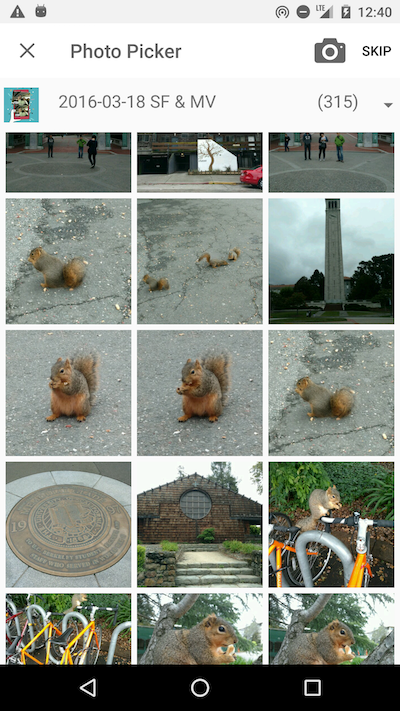
A cursor version of
RecyclerViewAdapteris somehow useful in clean architecture Android app.
Here is the sample code of CursorRecyclerViewAdapter, it is inspired by someone else (original link) and modified by me:
public abstract class CursorRecyclerViewAdapter<VH extends RecyclerView.ViewHolder>
    extends RecyclerView.Adapter<VH> {

    final private WeakReference<Context> mContext;
    final private WeakReference<LayoutInflater> mInflater;

    private RecyclerView mRecyclerView;
    private Cursor mCursor;

    // State.
    private boolean mDataValid;
    private int mRowIdColumn;

    public CursorRecyclerViewAdapter(Context context) {
        mContext = new WeakReference<>(context);
        mInflater = new WeakReference<>(LayoutInflater.from(context));
        mDataValid = false;
        mRowIdColumn = -1;

        // Enable stable-ID so that it is able to find ViewHolder by item ID.
        setHasStableIds(true);
    }

    @Override
    public int getItemCount() {
        if (mDataValid && mCursor != null && !mCursor.isClosed()) {
            return mCursor.getCount();
        } else {
            return 0;
        }
    }

    @Override
    public long getItemId(int position) {
        if (mDataValid &&
            mCursor != null && !mCursor.isClosed() &&
            mCursor.moveToPosition(position)) {
            return mCursor.getLong(mRowIdColumn);
        } else {
            return -1;
        }
    }

    @Override
    public void onBindViewHolder(VH viewHolder,
                                 int position) {
        this.onBindViewHolder(viewHolder, position, null);
    }

    @Override
    public void onBindViewHolder(VH viewHolder,
                                 int position,
                                 List<Object> payloads) {
        try {
            if (!mDataValid) {
                throw new IllegalStateException(
                    "this should only be called when the cursor is valid");
            }
            if (!mCursor.moveToPosition(position)) {
                throw new IllegalStateException(
                    "couldn't move cursor to position " + position);
            }
            if (BuildConfig.DEBUG) {
                Log.d("@", "onBindViewHolder(" + position +
                           "), context=" + getContext() +
                           ", running on " + Looper.myLooper());
            }

            onBindViewHolder(viewHolder, mCursor, payloads);
        } catch (Throwable exception) {
            if (BuildConfig.DEBUG) {
                Log.d("@", "onBindViewHolder(" + position +
                           "), error=" + exception.getMessage());
            }
        }
    }

    /**
     * Called by RecyclerView to display the data at the specified position.
     *
     * @param viewHolder The ViewHolder which should be updated to represent
     *                   the contents of the item at the given position in
     *                   the data set.
     * @param cursor     The cursor of the item within the adapter's data set.
     * @param payloads   A list of merged payloads (could be null). Can be
     *                   empty list if requires full update.
     */
    public abstract void onBindViewHolder(final VH viewHolder,
                                          final Cursor cursor,
                                          final List<Object> payloads);

    @Override
    public void onAttachedToRecyclerView(RecyclerView recyclerView) {
        super.onAttachedToRecyclerView(recyclerView);

        mRecyclerView = recyclerView;
    }

    @Override
    public void onDetachedFromRecyclerView(RecyclerView recyclerView) {
        super.onDetachedFromRecyclerView(recyclerView);

        mRecyclerView = null;
    }

    @SuppressWarnings("unused")
    final public Context getContext() {
        return mContext.get();
    }

    @SuppressWarnings("unused")
    final public LayoutInflater getInflater() {
        return mInflater.get();
    }

    @SuppressWarnings("unused")
    final public Cursor getCursor() {
        return mCursor;
    }

    @SuppressWarnings("unused")
    final public RecyclerView getRecyclerView() {
        return mRecyclerView;
    }

    /**
     * Return the ViewHolder for the item with the given id. The RecyclerView
     * must use an Adapter with
     * {@link RecyclerView.Adapter#setHasStableIds(boolean) stableIds}
     * to return a non-null value.
     * <p>
     * This method checks only the children of RecyclerView. If the item with
     * the given <code>id</code> is not laid out, it <em>will not</em> create
     * a new one.
     * <p>
     * When the ItemAnimator is running a change animation, there might be 2
     * ViewHolders with the same id. In this case, the updated ViewHolder will
     * be returned.
     *
     * @param id The id for the requested item
     *
     * @return The ViewHolder with the given <code>id</code> or null if there
     * is no such item
     */
    @SuppressWarnings("unused")
    final public RecyclerView.ViewHolder findViewHolderForItemId(final long id) {
        if (mRecyclerView == null) {
            throw new IllegalStateException(
                "No RecyclerView is observing this adapter.");
        }

        return mRecyclerView.findViewHolderForItemId(id);
    }

    /**
     * Return the ViewHolder for the item in the given position of the data set.
     * Unlike {@link RecyclerView#findViewHolderForLayoutPosition(int)} this
     * method takes into account any pending adapter changes that may not be
     * reflected to the layout yet. On the other hand, if
     * {@link RecyclerView.Adapter#notifyDataSetChanged()}
     * has been called but the new layout has not been calculated yet, this
     * method will return <code>null</code> since the new positions of views are
     * unknown until the layout is calculated.
     * <p>
     * This method checks only the children of RecyclerView. If the item at the given
     * <code>position</code> is not laid out, it <em>will not</em> create a new one.
     * <p>
     * When the ItemAnimator is running a change animation, there might be 2 ViewHolders
     * representing the same Item. In this case, the updated ViewHolder will be returned.
     *
     * @param position The position of the item in the data set of the adapter
     * @return The ViewHolder at <code>position</code> or null if there is no such item
     */
    @SuppressWarnings("unused")
    final public RecyclerView.ViewHolder findViewHolderForAdapterPosition(final int position) {
        if (mRecyclerView == null) {
            throw new IllegalStateException(
                "No RecyclerView is observing this adapter.");
        }

        return mRecyclerView.findViewHolderForAdapterPosition(position);
    }

    /**
     * Change the underlying cursor to a new cursor. If there is an existing
     * cursor it will be closed.
     */
    @SuppressWarnings("unused")
    public void setData(Cursor cursor) {
        Cursor old = swapCursor(cursor);
        if (old != null && !old.isClosed()) {
            old.close();
        }
    }

    ///////////////////////////////////////////////////////////////////////////
    // Protected / Private Methods ////////////////////////////////////////////

    /**
     * Swap in a new Cursor, returning the old Cursor. Unlike
     * {@link #setData(Cursor)}, the returned old Cursor is <em>not</em>
     * closed.
     */
    private Cursor swapCursor(Cursor newCursor) {
        if (newCursor == mCursor) {
            return null;
        }
        final Cursor oldCursor = mCursor;
        if (oldCursor != null && mDataSetObserver != null) {
            oldCursor.unregisterDataSetObserver(mDataSetObserver);
            oldCursor.close();
        }
        mCursor = newCursor;
        if (mCursor != null) {
            if (mDataSetObserver != null) {
                mCursor.registerDataSetObserver(mDataSetObserver);
            }
            mRowIdColumn = newCursor.getColumnIndexOrThrow(BaseColumns._ID);
            mDataValid = true;
        } else {
            mRowIdColumn = -1;
            mDataValid = false;
            //There is no notifyDataSetInvalidated() method in RecyclerView.Adapter
        }
        notifyDataSetChanged();
        return oldCursor;
    }

    // FIXME: Seems not work.
    final private DataSetObserver mDataSetObserver = new DataSetObserver() {
        @Override
        public void onChanged() {
            super.onChanged();
            mDataValid = true;
            notifyDataSetChanged();
        }

        @Override
        public void onInvalidated() {
            super.onInvalidated();
            mDataValid = false;
            notifyDataSetChanged();
            //There is no notifyDataSetInvalidated() method in RecyclerView.Adapter
        }
    };
}
Using setData() to assign the cursor. The adapter would observe the change of the database and automatically update the cursor for you.
/**
 * Change the underlying cursor to a new cursor. If there is an existing
 * cursor it will be closed.
 */
public void setData(Cursor cursor) {
    Cursor old = swapCursor(cursor);
    if (old != null && !old.isClosed()) {
        old.close();
    }
}

/**
 * Swap in a new Cursor, returning the old Cursor. Unlike
 * {@link #setData(Cursor)}, the returned old Cursor is <em>not</em>
 * closed.
 */
private Cursor swapCursor(Cursor newCursor) {
    if (newCursor == mCursor) {
        return null;
    }
    final Cursor oldCursor = mCursor;
    if (oldCursor != null && mDataSetObserver != null) {
        oldCursor.unregisterDataSetObserver(mDataSetObserver);
        oldCursor.close();
    }
    mCursor = newCursor;
    if (mCursor != null) {
        if (mDataSetObserver != null) {
            mCursor.registerDataSetObserver(mDataSetObserver);
        }
        mRowIdColumn = newCursor.getColumnIndexOrThrow(BaseColumns._ID);
        mDataValid = true;
    } else {
        mRowIdColumn = -1;
        mDataValid = false;
        //There is no notifyDataSetInvalidated() method in RecyclerView.Adapter
    }
    notifyDataSetChanged();
    return oldCursor;
}
The Design Of My “Gallery Photo Picker “
As a gallery photo picker, it is able to let user to select multple photos among several albums. The selected photos would be highlighted and I want to show users the selection pool so that they know what photos are selected and are able to cancel the selection even switching to other albums.
The requirement leads me to the design:
There would be an observable selection pool. Whenever you add a new item or delete an item, the pool would notify the changes to all the observers. My controller/presenter is observing to the observable selection pool. It is responsible to deliver the change to the RecyclerView.
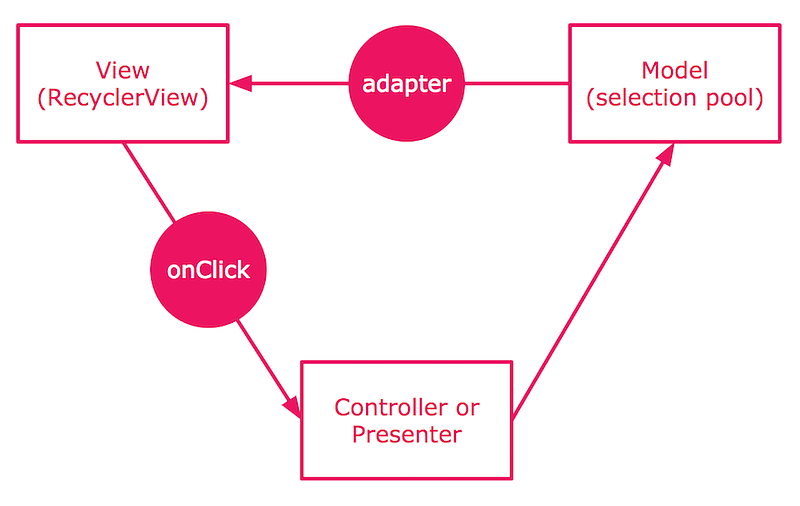
It is a single forward process.
There are notifyItemChanged() and notifyItemRangeChanged() functions for us to update specific item views. But there is still a problem, how to find out the position of the changed item (new selected or unselected photo)? I need to compare the changed item with the items owned by the adapter. Assume you have 100,000 photos in the album you are browsing. It’s not ok to go through the album to find out the position (that would block the user from selecting/unselecting next photo). In addition, the photos you are currently browsing might be from a differen album from the one you select photos.
My Solution
However, I need to go through a sub-set of the adapter to compare the elements with the changed item. So I need to know the range of the sub-set of the adapter.
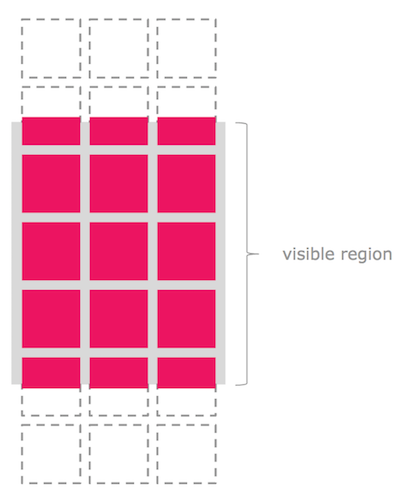
I tried the GridLayoutManager#findFirstVisibleItemPosition and GridLayoutManager#findLastVisibleItemPosition but they end up being not that helpful. Because they return the position of VISIBLE item.
I also tried RecycleView#findViewHolderForItemId and RecyclerView#findViewHolderForAdapterPosition but failed too. Because both these functions returns the view holder of the ATTACHED children view.
The items outside the visible region are very likely DETACHED from the RecyclerView. The RecyclerView maintains the recycling pool and the LayoutManager decide when to create and reuse the view holder.
Don’t cache the created view holder in your adapter. It is risky to leak the view holders.
I found there is no public API for us to find all the existing view holders (including the detached ones). Somehow, I could enlarge the range of the sub-set of the apater for comparison. Here is the snippet.
void onSelectionChanged(List<IPhoto> list,
                        IPhoto added,
                        IPhoto removed,
                        IPhoto updated) {
    // Go through the sub-set of the adapter to compare the element with the changed
    // item.

    // Find the position of first visible item.
    final int first = mPhotoListLayoutMgr.findFirstVisibleItemPosition();
    // Find the position of last visible item.
    final int last = mPhotoListLayoutMgr.findLastVisibleItemPosition();
    final int range = last - first;
    // Expand the searching window with tripple times.
    // It is enough because I'm using default policy for caching.
    final int start = Math.max(0, first - range);
    final int end = Math.min(mPhotoListAdapter.getItemCount() - 1, last + range);
    for (int i = start; i <= end; ++i) {
        final IPhoto photo = mPhotoListAdapter.getItemAt(i);

        if (added != null && added.equals(photo)) {
            mPhotoListAdapter.notifyItemChanged(
                i, PAYLOAD_ITEM_CHECKED);
        } else if (removed != null && removed.equals(photo)) {
            mPhotoListAdapter.notifyItemChanged(
                i, PAYLOAD_ITEM_UNCHECKED);
        }
    }
}
This solution works for me. I’m not sure if they will open such API in the new support library. Anyway, feel free to discuss it with me. 😀
The code link.