Related articles: Part 1, Part 3
Previously, I ran the dlib example on my Mac. Now, I’m trying to use NDK to cross-compile a shared library of ABI armeabi-v7a that could be used in an Android app. So I will have a dlib.so of ABI armeabi-v7a and a set of exported header files in the end of this chapter. These files would be used by an Android JNI module in the next chapter.
The reference specification:
OS: Mac
dlib:v19.4NDK:14.1Mac:10.12.4Homebrew:1.1.13

Environment setup
Step 1.
In order to use NDK, I install it through the package manager of Android Studio.
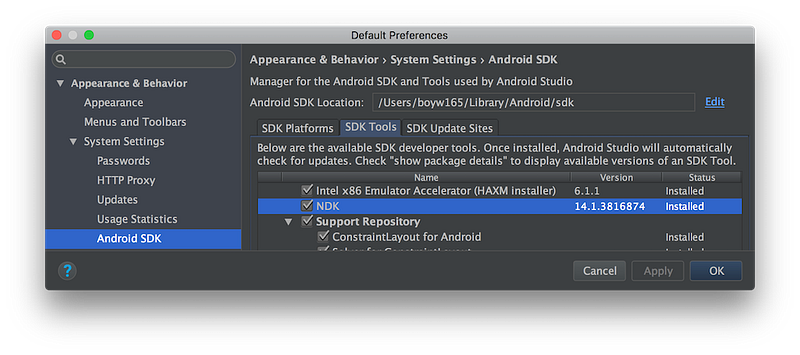
So the installed SDK will be at,
/Users/<your_user_name>/Library/Android/sdkAnd the NDK is at,
/Users/<your_user_name>/Library/Android/sdk/ndk-bundle**Step 2.
**I also setup the environment variables for SDK, NDK or simply letting myself type in less keys.
Add the following code to my ~/.zshrc:
# Env variable for Android SDK.
export ANDROID="$HOME/Library/Android/sdk"
export ANDROID_HOME="$HOME/Library/Android/sdk"
# Env variable for Android NDK.
export ANDROID_NDK="$HOME/Library/Android/sdk/ndk-bundle"
export ANDROID_NDK_HOME="$HOME/Library/Android/sdk/ndk-bundle"
# Env variable for Android cmake.
export ANDROID_CMAKE="$ANDROID_HOME/cmake/3.6.3155560/bin/cmake"
Step 3.
Cross compiling is always annoying. In addition to setup CC and CXX, I need to assign CMAKE_SYSTEM_PROCESSOR, CMAKE_FIND_ROOT_PATH environment variables and more. Luckily, Google NDK provides a CMake configuration file, android.toolchain.cmake, which could save my time of configuring the environment for cross compiling. I think the configuration file could be used almost everywhere.
To get the android.toolchain.cmake file:
1. You could either download it from patched version for r14 or latest version. (If you’re not familiar with CMake, use the patched version)
2. Or install CMake through the package manager of Android Studio.
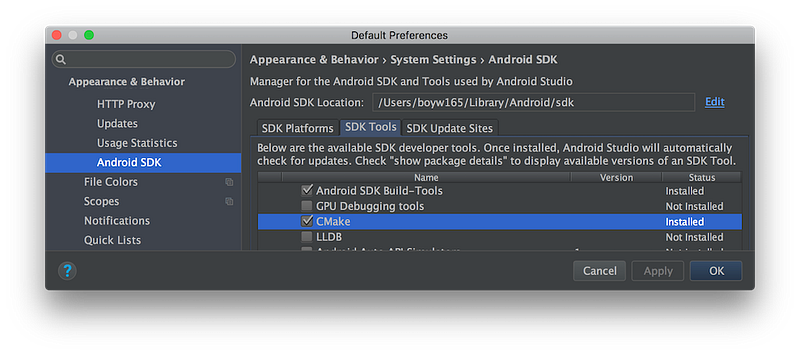
And the android.toolchain.cmake would be in the folder,
/Users/<your_user_name>/Library/Android/sdk/cmake/<cmake_ver>/(Optional) Generate the standalone toolchain:
In the official document, I generate the toolchain (a set of compiler, linker, header files and libraries) for ABI armeabi-v7.
#  --arch {arm,arm64,mips,mips64,x86,x86_64}
#  --api API             Target the given API version (example: "--api 24").
#  --stl {gnustl,libc++,stlport}
#                        C++ STL to use.
#  --install-dir INSTALL_DIR
#                        Install toolchain to the given directory instead of
#                        packaging.
$ANDROID_NDK/build/tools/make_standalone_toolchain.py \
    --stl libc++ \
    --arch arm --api 16 \
    --install-dir <your_path>/toolchain-android-16-arm

# -h, --help             show this help message and exit
Build!
There’re four main steps as follows:
1. I’m using dlib of version v19.4. So I switch to the right git commit v19.4, which is 581332ba.
2. The code is in the dlib folder. In order not to mess up the generated code and source code together. I ran the build process in the dlib/build-armeabi-v7a folder.
3. Run cmake along with android.toolchain.cmake configuration.
4. Build the shared library with the generated Makefile.
5. (Optional) Install the generated binary files and exported header files to specific folder.
# Step 1. Switch to the release commit. For example: v19.4.
git checkout v19.4

# Step 2. Create the build folder for storing generated files.
cd dlib && mkdir build-armeabi-v7a && cd build-armeabi-v7a;

# Step 3. Use CMake to generate the Makefile.
# -DCMAKE_INSTALL_PREFIX                    Because it's a cross-compiled library. You probably
#                                           want to install the header files and shared library
#                                           in specific folder rather than default /usr/local
#                                           directory.
# -DANDROID_STL=c++_shared                  For the library using C++11, link to C++11 runtime.
# -DANDROID_LINKER_FLAGS="-landroid -llog"  For the library using functions of libandroid.so
#                                           and liblog.so.
# -DANDROID_CPP_FEATURES="rtti exceptions"  Most ppl use exception and runtime-type-information
#                                           features in their C++ projects.
#
# Debug Tips:
# Add -LAH to see variables.
$CMAKE \
    -DCMAKE_BUILD_TYPE=Release \
    -DCMAKE_TOOLCHAIN_FILE=/<your_toolchain_config_path>/android.toolchain.cmake \
    -DCMAKE_INSTALL_PREFIX=/<your_install_path>/dlib \
    -DANDROID_NDK=/Users/<your_user_name>/Library/Android/sdk/ndk-bundle \
    -DANDROID_TOOLCHAIN=clang \
    -DANDROID_ABI=armeabi-v7a \
    -DANDROID_NATIVE_API_LEVEL=16 \
    -DANDROID_LINKER_FLAGS="-landroid -llog" \
    -DANDROID_STL=c++_shared \
    -DANDROID_CPP_FEATURES="rtti exceptions" \
    ..

# Step 4. Build by the given generated Makefile.
$CMAKE --build .

# Step 5 (optional). Install the library.
make install
There’re two important things you could keep in mind:
1. The dlib uses c++11 feature, so I can’t use default STL setting (gnu one).
2. The linked STL setting must be the same with the one of JNI. Otherwise you would get a bunch of errors like, “referenced symbol not found”, when compiling the JNI code.
Some old Android devices are stilling using
armeabiABI. To build a library for ABI ofarmeabi, just use-DANDROID_ABI=armeabi.
WitharmeabiABI, the performance of floating calculation is bad.
Build for “armeabi” or else?
You could reuse the above scrips but update the -DANDROID_ABI argument.
# Options: # armeabi, armeabi-v7a, arm64-v8a, x86, x86_64, mips, mips64-DANDROID_ABI=armeabiStay tuned
Hope you could cross-compile it successfully. In the next article, I would be trying to create a JNI module wrapping the library and have an Android demo app.