Related articles: Part 1, Part 2
Previously, I used NDK cross-compile to come up with the libdlib.so file of all ABI that NDK supports. In this article, I’ll share you with how I integrate the dlib library into an Android demo app. Here we go!
The reference specification:
OS: Mac
dlib:v19.4NDK:14.1Mac:10.12.4Homebrew:1.1.13
Create An Android Library Module
Previously, I had cross-compile the shared library. Now, **I need to write JNI code to let Java code able to call the native functions. In order to have the JNI code reusable, I want to encapsulate the whole thing in an Android library module.
**Android.mk and CMake are similar build system that generates Makefile for you with simplified syntax. Since Android Studio 2.2 and higher, we could use CMake to compile C and C++ code into a native library. **Unlike Android.mk, CMake allows me to do more file operation, e.g. copy out the generated file.
**Google provides a good example of how to create JNI library, Google NDK Sample. I’m going to follow the sample and name the module as lib-dlib. Following is a snapshot of folder organization of the lib-dlib module.
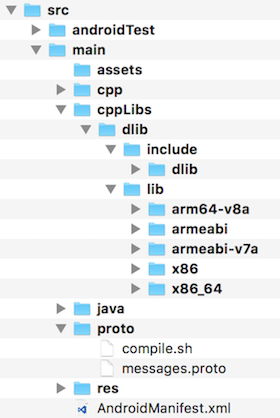
snapshot of folder organization of lib-dlib
The pre-built libdlib.so are all in the src/main/cppLibs/dlib/lib folder. And all the dlib header files are in src/main/cppLibs/dlib/include folder. The JNI code is in the src/main/cpp folder. The folder naming could be up to you, but make sure you have correct externalNativeBuild setting in the build.gradle. In a nutshell, gradle needs to know where is your CMakelists.txt and CMake (through CMakelists.txt) needs to know where to link the dependent files. I’ll be telling more later on.
Step 1: build.gradle
In order to let gradle use external build (using CMake), I need to add the some code to my build.gradle. In the defaultConfig, I add some CMake parameters for the default setting. The -DANDROID_PLATFORM=android-16 indicates the minimum API level for running native code; -DANDROID_STL=c++_shared is because dlib uses C++11.
android { ... defaultConfig { ... ndk { abiFilters "x86", "x86_64", "armeabi", "armeabi-v7a", "arm64-v8a" } externalNativeBuild { cmake { arguments "-DANDROID_PLATFORM=android-16", "-DANDROID_TOOLCHAIN=clang", "-DANDROID_STL=c++_shared", "-DANDROID_CPP_FEATURES=rtti exceptions" } } }}I also need to tell the gradle that where is my CMakeLists.txt by setting a path in the externalNativeBuild property. It’s also important to let gradle to pack the pre-built shared library into apk with sourceSets property.
android { ... // Let gradle know my CMakeLists.txt. externalNativeBuild { cmake { path "src/main/cpp/CMakeLists.txt" } } // Let gradle pack the shared library into apk. sourceSets { main { jniLibs.srcDirs = ["src/main/cppLibs/dlib/lib"] } } // Pick first one if there're duplicate in the dependent modules. packagingOptions { pickFirst "**/libc++_shared.so" }}Step 2: CMakeLists.txt
InCMakeLists.txt, you need to define what to build and where to link the header files/static/shared libraries. Using add_library or add_executable to define the main target; target_include_directories is to define the searching paths for header files; target_link_libraries is to define the searching paths for shared libraries.
# Configure build library name.set(TARGET_NAME dlib_jni)# Configure install folder for:# 1) Finding the dependent libraries.# 2) Copy out the generated files for others to use.set(INSTALL_DIR ${CMAKE_SOURCE_DIR}/../../../../lib-distribution/)# Configure import libs.set(LIB_DIR ${CMAKE_SOURCE_DIR}/../cppLibs)# Configure the main build target (JNI wrapper).add_library(${TARGET_NAME} SHARED dlib-jni.cpp include/my/dlib/data/messages.pb.cc)target_include_directories(${TARGET_NAME} PRIVATE ${INSTALL_DIR}/protobuf_jni/include ${CMAKE_SOURCE_DIR}/include ${LIB_DIR}/dlib/include)target_link_libraries(${TARGET_NAME} dlib protobuf android jnigraphics log)After the build, there would be libdlib_jni.so file and both libdlib.so, libdlib_jni.so and all the header files would be copied to the lib-distribution in the root folder for other modules to use.
Step 3: Write JNI.
My goal is to detect face landmarks, so I reference to the sample code (link). There’re 6 steps to do a face landmarks detection in the JNI code:
1. Deserialize the pre-trained model to a dlib::shape_predictor instance.
2. Initialize the dlib::frontal_face_detector instance.
3. Convert Java Bitmap object to dlib::array2d<dlib::rgb_pixel>.
4. Find the face boundaries, std::vector<dlib::rectangle>.
5. Given the face boundaries, find the landmarks (dlib::full_object_detection) per face.
6. Return the landmarks to Java layer.
I use Google Protobuf as the exchange data format to return data from native layer to Java layer. For more information, check out my article.
Here is a snapshot of the JNI native code:
extern "C" JNIEXPORT jbyteArray JNICALL
JNI_METHOD(detectFacesAndLandmarks)(JNIEnv *env,
                                    jobject thiz,
                                    jobject bitmap) {
    if (sFaceDetector.num_detectors() == 0) {
        LOGI("L%d: sFaceDetector is not initialized!", __LINE__);
        throwException(env, "sFaceDetector is not initialized!");
        return NULL;
    }
    if (sFaceLandmarksDetector.num_parts() == 0) {
        LOGI("L%d: sFaceLandmarksDetector is not initialized!", __LINE__);
        throwException(env, "sFaceLandmarksDetector is not initialized!");
        return NULL;
    }

    // Profiler.
    Profiler profiler;
    profiler.start();

    // Convert bitmap to dlib::array2d.
    dlib::array2d<dlib::rgb_pixel> img;
    convertBitmapToArray2d(env, bitmap, img);

    double interval = profiler.stopAndGetInterval();

    const float width = (float) img.nc();
    const float height = (float) img.nr();
    LOGI("L%d: input image (w=%f, h=%f) is read (took %.3f ms)",
         __LINE__, width, height, interval);

    profiler.start();

    // Now tell the face detector to give us a list of bounding boxes
    // around all the faces in the image.
    std::vector<dlib::rectangle> dets = sFaceDetector(img);
    interval = profiler.stopAndGetInterval();
    LOGI("L%d: Number of faces detected: %u (took %.3f ms)",
         __LINE__, (unsigned int) dets.size(), interval);

    // Protobuf message.
    FaceList faces;
    // Now we will go ask the shape_predictor to tell us the pose of
    // each face we detected.
    for (unsigned long j = 0; j < dets.size(); ++j) {
        profiler.start();
        dlib::full_object_detection shape = sFaceLandmarksDetector(img, dets[j]);
        interval = profiler.stopAndGetInterval();
        LOGI("L%d: #%lu face, %lu landmarks detected (took %.3f ms)",
             __LINE__, j, shape.num_parts(), interval);

        profiler.start();

        // To protobuf message.
        Face* face = faces.add_faces();
        // Transfer face boundary.
        Rectangle* bound = face->mutable_bound();
        bound->set_left((float) dets[j].left() / width);
        bound->set_top((float) dets[j].top() / height);
        bound->set_right((float) dets[j].right() / width);
        bound->set_bottom((float) dets[j].bottom() / height);
        // Transfer face landmarks.
        for (u_long i = 0 ; i < shape.num_parts(); ++i) {
            dlib::point& pt = shape.part(i);

            Landmark* landmark = face->add_landmarks();
            landmark->set_x((float) pt.x() / width);
            landmark->set_y((float) pt.y() / height);
        }
        interval = profiler.stopAndGetInterval();
        LOGI("L%d: Convert #%lu face to protobuf message (took %.3f ms)",
             __LINE__, j, interval);
    }

    profiler.start();

    // Prepare the return message.
    int outSize = faces.ByteSize();
    jbyteArray out = env->NewByteArray(outSize);
    jbyte* buffer = new jbyte[outSize];

    faces.SerializeToArray(buffer, outSize);
    env->SetByteArrayRegion(out, 0, outSize, buffer);
    delete[] buffer;

    interval = profiler.stopAndGetInterval();
    LOGI("L%d: Convert faces to protobuf message (took %.3f ms)",
         __LINE__, interval);

    return out;
}
Then I write a Java code to call the native function. Because the model can detect 68 landmarks, I name the class with FaceLandmarksDetector68. The only thing important is to make sure the dependent native libraries are loaded before calling the JNI functions.
public class FaceLandmarksDetector68 {

    public FaceLandmarksDetector68() {
        // Load STL library.
        try {
            System.loadLibrary("c++_shared");
            Log.d("jni", "libc++_shared.so is loaded");
        } catch (UnsatisfiedLinkError error) {
            throw new RuntimeException(
                "\"c++_shared\" not found; check that the correct native " +
                "libraries are present in the APK.");
        }

        // Load protobuf-lite library.
        try {
            System.loadLibrary("protobuf-lite-3.2.0");
            Log.d("jni", "libprotobuf-lite-3.2.0.so is loaded");
        } catch (UnsatisfiedLinkError error) {
            throw new RuntimeException(
                "\"protobuf-lite-3.2.0\" not found; check that the correct " +
                "native libraries are present in the APK.");
        }

        // Load pre-built libdlib.so.
        try {
            System.loadLibrary("dlib");
            Log.d("jni", "libdlib.so is loaded");
        } catch (UnsatisfiedLinkError error) {
            throw new RuntimeException(
                "\"dlib\" not found; check that the correct native libraries " +
                "are present in the APK.");
        }

        // Load the JNI, libdlib_jni.so.
        try {
            System.loadLibrary("dlib_jni");
            Log.d("jni", "libdlib_jni.so is loaded");
        } catch (UnsatisfiedLinkError error) {
            throw new RuntimeException(
                "\"dlib_jni\" not found; check that the correct native " +
                "libraries are present in the APK.");
        }
    }

    public List<Face> findFacesAndLandmarks(Bitmap bitmap)
        throws InvalidProtocolBufferException {
        // Do the face landmarks detection.
        final byte[] rawData = detectFacesAndLandmarks(bitmap);
        final Messages.FaceList rawFaces = Messages.FaceList.parseFrom(rawData);
        Log.d("xyz", "Detect " + rawFaces.getFacesCount() + " faces");

        // Convert raw data to my data structure.
        final List<Face> faces = new ArrayList<>();
        for (int i = 0; i < rawFaces.getFacesCount(); ++i) {
            final Messages.Face rawFace = rawFaces.getFaces(i);
            final Face face = new Face68(rawFace);
            Log.d("xyz", "Face #" + i + "=" + face);

            faces.add(face);
        }

        return faces;
    }

    /**
     * Find the faces and landmarks from the given Bitmap.
     * <br/>
     * Before calling this method, make sure the face and landmarks detectors
     * are both initialized. Otherwise a {@link RuntimeException} would be fired.
     *
     * @param bitmap The bitmap.
     * @return The byte array of serialized {@link List< Face >}.
     */
    private native byte[] detectFacesAndLandmarks(Bitmap bitmap);
}
Profiling
For simplifying the experiment, I built an app that simply passes an photo to the JNI and it performs really well! Four things I observe:
1. Deserializing the models takes about 4 seconds in total;
2. Converting Java Bitmap to dlib::array2d<dlib::rgb_pixel> takes about 7 milliseconds;
3. Finding face rectangles takes about 1 second;
4. Aligning 68 landmarks per face takes about 10 milliseconds!
So the landmarks detecting algorithm is real-time. The bottleneck is how to significantly boost face rectangles detection. I know somebody uses OpenCV to do the face rectangle detection instead.
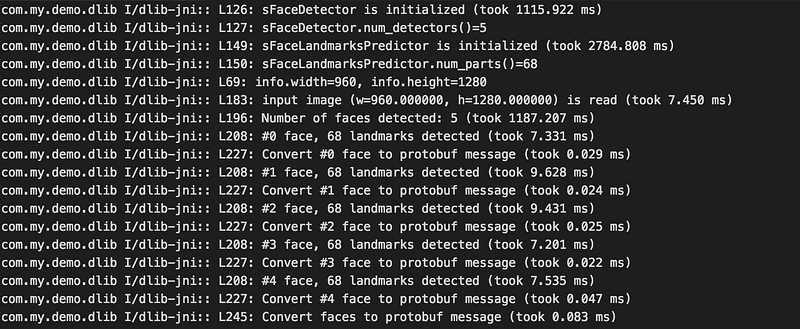
Although the face rectangles detection is fast, there is still space to improve.
e.g. How could we improve the precision of landmarks alignment algorithm even under a darker environment? Could the landmarks alignment algorithm works if I block one eye with my hand?
Source Code
Thanks for reading. For the full sample project, you could check out here. Feel free to discuss with me. 😁
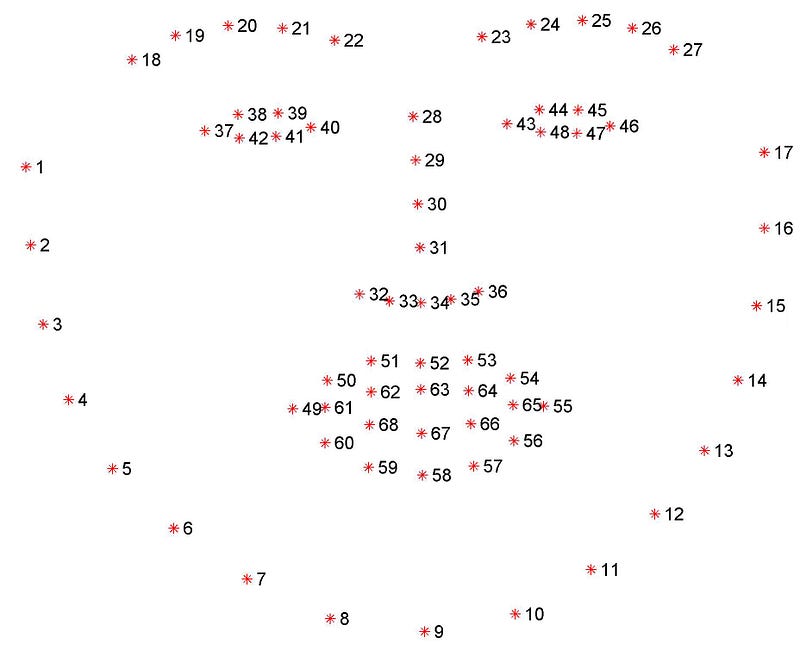
Index of the landmarks