Let’s assume that your app has many entries (Activity/Fragment/Service) to access the IAP(In-App-Purchase) and you might also handle the results in a similar way. The naive way is to have a helper class used in many places. Somehow, the workflow of IAP is bound to the Activity‘s lifecycle like, onStart()/onStop, onResume()/onPause() and onActivityResult() functions. So you might end up with having similar duplicate codes in many places just for the IAP! 😅️
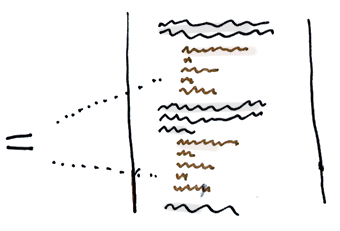
Duplicate codes
How to collect all the IAP codes in one place?
Since the workflow of IAP is bound to the Activity‘s lifecycle, let’s create an invisibleDelegateActivity to handle it for us.
First, let’s create a theme that makes the Activity invisible.
<?xml version="1.0" encoding="utf-8"?>
<resources>
    <!-- Shadow/Invisible Activity theme -->
    <style name="AppTheme.Invisible" parent="Theme.AppCompat.NoActionBar">
        <item name="android:windowIsTranslucent">true</item>
        <item name="android:windowBackground">@android:color/transparent</item>
        <item name="android:windowContentOverlay">@null</item>
        <item name="android:windowIsFloating">true</item>
        <item name="android:backgroundDimEnabled">false</item>
    </style>
</resources>
And create the DelegateActivity like the sample:
public class IapDelegateActivity extends AppCompatActivity {
    /**
     * The IAP task is successful.
     */
    public static final String ACTION_IAP_OK = "my.intent.action.IAP_OK";
    /**
     * The IAP task is failed.
     */
    public static final String ACTION_IAP_CANCELED = "my.intent.action.IAP_CANCELED";

    public static final String PARAMS_SKU = "PARAMS_SKU";
    public static final String PARAMS_SKU_PRICE = "PARAMS_SKU_PRICE";

    String mSku;
    float mSkuPrice;

    @Override
    protected void onCreate(Bundle savedInstanceState) {
        super.onCreate(savedInstanceState);

        final Intent intent = getIntent();
        mSku = intent.getStringExtra(PARAMS_SKU);
        mSkuPrice = intent.getFloatExtra(PARAMS_SKU_PRICE, 0f);
    }

    @Override
    protected void onStart() {
        super.onStart();

        // TODO: Handle the IAP task.
    }

    @Override
    protected void onStop() {
        super.onStop();

        // TODO: Interrupt the IAP task if necessary.
    }

    @Override
    protected void onSaveInstanceState(Bundle outState) {
        super.onSaveInstanceState(outState);

        // TODO: Save the SKU and SKU price in case the "Don't Keep Activity"
        // TODO: is enabled.
    }

    @Override
    protected void onRestoreInstanceState(Bundle savedState) {
        super.onRestoreInstanceState(savedState);

        // TODO: Restore the SKU and SKU price.
    }

    @Override
    protected void onActivityResult(int requestCode,
                                    int resultCode,
                                    Intent data) {
        if (resultCode == RESULT_OK) {
            // Notify the subscribers.
            sendBroadcast(
                new Intent(ACTION_IAP_OK)
                    .putExtra(PARAMS_SKU, mSku)
                    .putExtra(PARAMS_SKU_PRICE, mSkuPrice));
        } else {
            // Notify the subscribers.
            sendBroadcast(
                new Intent(ACTION_IAP_CANCELED)
                    .putExtra(PARAMS_SKU, mSku)
                    .putExtra(PARAMS_SKU_PRICE, mSkuPrice));
        }

        setResult(resultCode);
        finish();
    }
}
The PARAMS_SKU and PARAMS_SKU_PRICE are for passing the necessary information to the DelegateActivity. The ACTION_IAP_OK and ACTION_IAP_CANCELED are for reporting the status of result.
In the onActivityResult, it provides two ways for you to subscribe to the IAP result. One is that it returns the result to the caller Activity/Fragment straightforwardly. The other is that it fires an Intent broadcast to whoever is interested in the result. By doing so, …
- It allows you to collect all the codes for handling the IAP result in a god
BroadcastReceiverclass. - And You could easily move the
DelegateActivityto an independent Android library. - The
DelegateActivityis clean and focusing doing the IAP job without losing the ability of letting the application module to respond to the result.
That helps a lot for modularizing the component and making your project well organized.
Last, be sure to add the DelegateActivity and IapResultReceiver (optional) to the AndroidManifest.xml and assign the invisible theme to it.
<?xml version="1.0" encoding="utf-8"?>
<manifest package="com.my.whatever"
          xmlns:android="http://schemas.android.com/apk/res/android">

    <uses-permission android:name="com.android.vending.BILLING"/>

    <application>
        <activity
            android:name=".IapDelegateActivity"
            android:theme="@style/AppTheme.Invisible">
        </activity>

        <!-- BroadcastReceiver //////////////////////////////////////////// -->

        <receiver android:name=".IapResultReceiver"
                  android:exported="false" >
            <intent-filter>
                <action android:name="my.intent.action.IAP_OK" />
                <action android:name="my.intent.action.IAP_CANCELED" />
            </intent-filter>
        </receiver>
    </application>
</manifest>
For the caller, the usage is straightforward.
// Example 1, from an android.app.Activity:
// Use the startActivityForResult(Intent, int) and subscribe
// the result in onActivityResult(int, int, Intent).
startActivityForResult(
    new Intent(this, IapDelegateActivity.class)
        .putExtra(IapDelegateActivity.PARAMS_SKU, "sku")
        .putExtra(IapDelegateActivity.PARAMS_SKU_PRICE, 1.99f));

// Example 2, from a android.app.Service:
// Use the startActivity(Intent) and subscribe the result in
// android.content.BroadcastReceiver.onReceive(Context, Intent).
startActivity(
    new Intent(this, IapDelegateActivity.class)
        .putExtra(IapDelegateActivity.PARAMS_SKU, "sku")
        .putExtra(IapDelegateActivity.PARAMS_SKU_PRICE, 1.99f))
That’s pretty much done! One more optional thing is that you might be interested in using the DelegateActivity in many projects. For example, you could have the DelegateActivity in an Android library module separately to the main application module. A screenshot of the folder structure from my project is like,
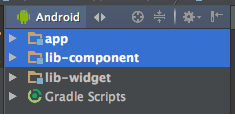
A sample of Android Studio project
The DelegateActivity is living in the “lib-component” module and the “lib-component” module is used by the “app” application. Because the DelegateActivity supports the BroadcastReceiver way to deliver the result to the subscribers, you could do anything you want in the app’s BroadcastReceiver without worrying about the coupled dependency!

Versus Having an “AbstractIapActivity”?
Someone has said:
Object-oriented programming is about objects: bundles of state and behavior.
I read that from this article couple days ago. So the states are a set of variables (class member fields) that are manipulated by a set of behaviors (class member functions), and the descendants care about the state!
In our case, the Activity/Fragment cares about the result (succeed or failed) instead of the state of IAP, that’s it, no more!
Inheritance requires children to understand their parents. Subclassing leads to bloat (something Java needs more of…), because children inherit the methods of their entire ancestry chain.
And What if you want the Activity to inherit from other Activity rather than just handling the IAP job? Or what if you request IAP in a Fragment?
That leads me to end up with using the DelegateActivity. By the way, you could also apply the Composition Pattern to the DelegateActivity so that it is more flexible!
Conclusion
Next time you’re required to implement a feature bound to the Activity‘s lifecycle (e.g. runtime permission), the combination of an invisible DelegateActivity and a BroadcastReceiver are your good friends. Maybe the overhead of memory usage will be the only disadvantage.
There you go the sample codes (in progress). 😅️