From the official document, we know the inline function is similar to C/C++ Macro, where the instruction of the function is copied-and-pasted by the compiler to the call-sites.
My Kotlin Gradle plugin version is 1.2.60
When to use inline?
Kotlin extension is resolved statically which means the instruction of the extension is sitting somewhere and calling it takes space of the stack in the runtime. Therefore, we could use the inline extension for saving the runtime overhead because both the function objects and classes need memory allocation. In addition, we could also use the inline function to hide the internal dependency from the external world, and we’ll talk about it later in this article.
Let’s take a look of the inline extension. For example, we have a runSafely inline extension for Canvas:
inline fun Canvas.runSafely(
    lambda: Canvas.() -> Unit
) {
    val checkPoint = save()

    // "this" is Canvas
    lambda.invoke(this)

    restoreToCount(checkPoint)
}
And here is a view using the inline extension (the call-site).
override fun onDraw(canvas: Canvas) {
    super.onDraw(canvas)

    // Invoke the inline function
    canvas.runSafely {
        println("test")
    }
}
From the byte-code level in the call-site, you could see the instructions from #14 to #36 is the expansion of the inline extension.
protected void onDraw(android.graphics.Canvas);
  Code:
    // Some byte-code is hidden
    14: invokevirtual #23  // Method android/graphics/Canvas.save:()I
    17: istore_3
    18: aload_2
    19: astore        4
    21: ldc           #25  // String test
    23: astore        5
    25: getstatic     #31  // Field java/lang/System.out:Ljava/io/PrintStream;
    28: aload         5
    30: invokevirtual #37  // Method java/io/PrintStream.println:(Ljava/lang/Object;)V
    33: nop
    34: aload_2
    35: iload_3
    36: invokevirtual #41  // Method android/graphics/Canvas.restoreToCount:(I)V
    // ...
What about not using inline?
fun Canvas.runSafely(
    lambda: Canvas.() -> Unit
) {
    val c = save()
    lambda.invoke(this)
    restoreToCount(c)
}
With the same call-site except removing the inline modifier of the extension, it ends up calling a static method from the extension class byte-code, which is exactly resolved statically.
protected void onDraw(android.graphics.Canvas);
  Code:
    // Some byte-code is hidden
    18: invokestatic  #31  // Method CanvasExtensionsKt.runSafely:(Landroid/graphics/Canvas;Lkotlin/jvm/functions/Function1;)V
    // ...
public final class CanvasExtensionsKt {
public static final void runSafely(android.graphics.Canvas, kotlin.jvm.functions.Function1<? super android.graphics.Canvas, kotlin.Unit>);
Code:
// Some byte-code is hidden
13: invokevirtual #23 // Method android/graphics/Canvas.save:()I
16: istore_2
17: aload_1
18: aload_0
19: invokeinterface #29, 2 // InterfaceMethod kotlin/jvm/functions/Function1.invoke:(Ljava/lang/Object;)Ljava/lang/Object;
24: pop
25: aload_0
26: iload_2
27: invokevirtual #33 // Method android/graphics/Canvas.restoreToCount:(I)V
30: return
}The inline function could seal the internal dependency
In modern software development, we create modules and have modules depend on the other modules. For example:
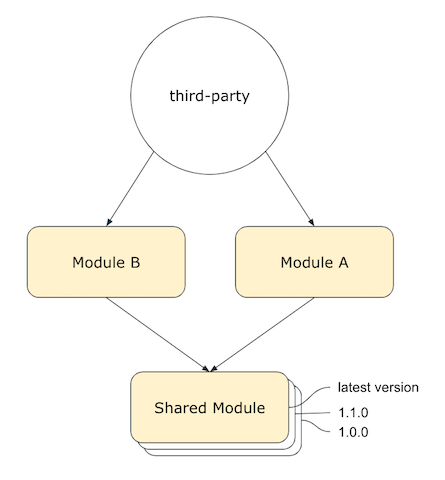
Sometimes, you don’t want the third-party to depend on the internal shared module because that dependency plus the versioning becomes really annoying arguably. In fact, if the shared module is small enough not causing the generated code to grow too rapidly, we could hide this internal dependency from the external world with the inline function.
To really seal the internal dependency in the Android Gradle build system, we need to use the compileOnly to declare the dependency.
compileOnly project(path: ':shared-module')The compileOnly adds the dependency to the compile classpath only. This is useful when you’re creating an Android module and you need the dependency during compilation.
The summary of this dependency sealing strategy is:
- Hide the dependency by using compileOnly.
- Embed the instructions with inline functions.
Use it with caution
The following side-by-side comparison shows you how much the generated code with the inline function versus the normal function. This sealing strategy is just a possible solution and you should use it with caution.

inline extension vs not-inline extension
BTW, I use javap command to decompile the Java classes.
javap -c -private JAVA_CLASSES_WITHOUT_DOT_CLASS_EXTENSIONStay tuned
The inline function actually comes with two extra modifiers, the noinline and crossinline, I’ll write another article about that, still specifically about the byte-code level!
Thanks for reading and don’t hesitate to give me claps if you do learn something from the article.