2018/03.29 Updated: RxAndroid -> RxJava in title.
2018/02/19 Updated: Add “try #3” withtakeUntil.
The App has stopped
There are so many interrupts for an Android app. For example: when a user is browsing a news feed, an incoming phone call is an interrupt, user tapping the system back button is an interrupt, login with switching Activity is an interrupt, …etc.
How could the interrupt harm the app? Think about this case:
When an interrupt happens and the Activity is pushed to the background, one async task just finishes its work and your code responds to the result by accessing the UI. Boom! An IllegalStateException or a NullPointerException is raised because the Activity is no longer active. It is made obvious by turning on the Don’t Keep Activity mode.
Usually, you make sure to unregister all the callbacks of the async-tasks that access the UI in the Activity’s onDestroy. When there are a lot of async-tasks to take care of, the code becomes more complicated.
RxJava is very good at managing states for apps with UI. The best thing it does very well is the separation-of-concern and has a chained recycling process. If you’ve ever used RxJava, you will notice that a big difference between the Observable and imperative callback is the number arguments in the payload. Unlike callback functions with as many as arguments you want, the Observable accepts only one thing for the downstream. This design bothered me a lot and now I figure out it implicitly forces you to do well separation-of-concern by giving each Observable the least responsibility. If each Observable takes minimum responsibility, one payload is just enough!
Case Study
In the PicCollage app, there is a share-to-social-network feature. When the user click the sharing button, a sequence of async-tasks need to be processed:
- Show a progress-bar and generate a HD Bitmap for sharing. When the task is finished, hide the progress-bar.
- Show a dialog to ask the user to fill in the post message.
- If the previous dialog is confirmed, show a progress-bar and share to the target social network site. When the sharing task is finished, hide the progress-bar.
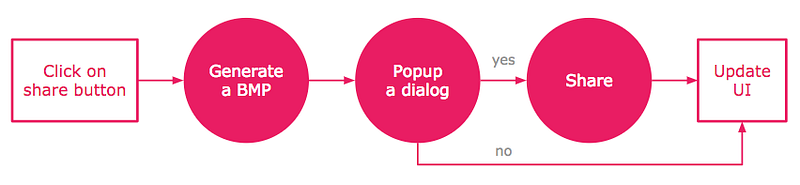
The problem is: the user might cancel at any step of the three steps, so to design the system to handle the cancellation?
Use Observable
One reason that I love Observable is the chained recycling process. RxJava is essentially a framework that builds double-linked-list of lambda functions (code blocks) and each Observable (a node in a linked-list) is responsible for providing a Disposable to its downstream (through onSubscribeActual()). So the downstream (a.k.a Observer) would be able to ask the source to stop by calling the given Disposable’s dispose(), and the disposing process goes from bottom to top, all the way to the top most upstream.
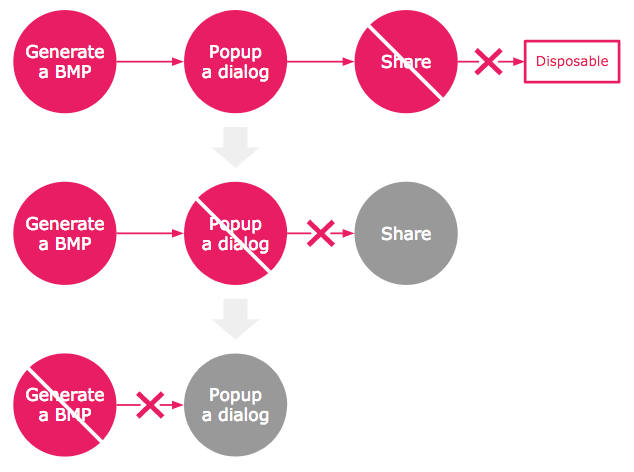
Try #1, naive approach:
I have to make a generate-BMP, a popup-dialog and a share-to-FB observable, and wire them together with switchMap operator (remember that a switchMap does … and we use it here to …. I also hold the returned sharingDisposable for terminating the stream later. For example:
// Hold the disposable in order to cancel the operation later.
val sharingDisposable = mView
    .onClickStart()
    .switchMap { _ ->
        // 1. Generate BMP
        getGenBmpObservable()
            // 2. Show dialog
            .switchMap { _ ->
                getDialogSingle().toObservable()
            }
            // 3. Share
            .switchMap { dialogPayload ->
                if (dialogPayload.result == RESULT_OK) {
                    // If the user clicks OK, share to FB.
                    getShareToFacebookObservable(dialogPayload.data)
                } else {
                    // The EMPTY observable calls observer's onComplete()
                    // to indicate the stream is over.
                    Observable.empty()
                }
            }
    }
    .subscribe { _ ->
        Log.d("xyz", "all finished!")
    })

// When the cancel signal is received, dispose the observable chain.
onClickCancel()
    .subscribe { _ ->
        sharingDisposable.dispose()
    }
The marble diagram looks like:
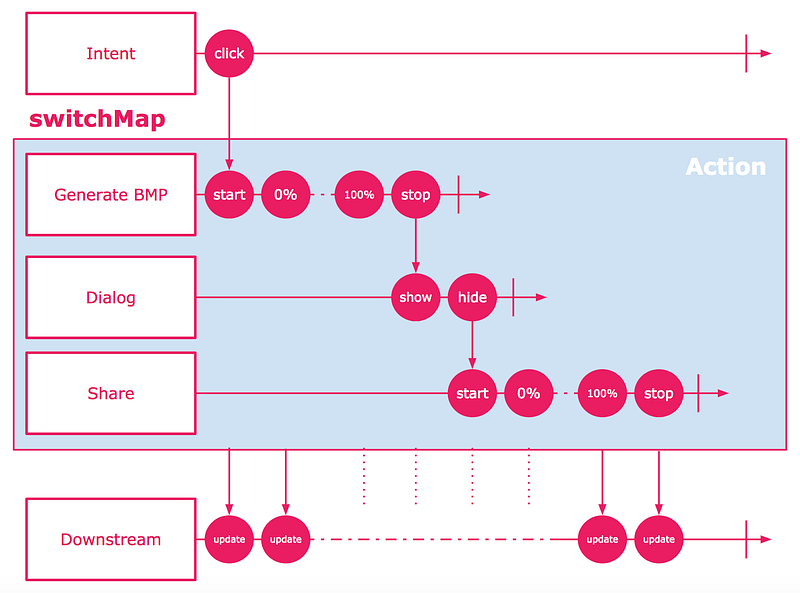
The light-blue block could be interrupted or replaced.
I hold the sharingDisposable so that I could call sharingDisposable.dispose() to cancel the unfinished job.
This naive implementation, however, has a critical problem: calling dispose() would terminate the whole stream, which means you cannot receive the button click anymore. In order to make button click work again, you have to rewire the stream after the cancelation.
The other problem is that we have to share the sharingDisposable among the callbacks of system-back-button, progress-dialog-cancelation, and my custom cancel-button.
Anyway, the code is just not neat enough and it is yet Reactive Programming.
Try #2, reactive approach with “switchMap”:
One spirit of the Reactive Programming is the single-forward-direction of event system. In the pure reactive world, components are a set of functions that take input and compute the output. Therefore, there are barely state variables in your business logic.
In the previous example, the sharingDisposable is kind of state shared among different functions. Is it possible to not have to rewire the sharing stream over and over again?
Yes, we can! We can make the cancelation (or interrupt) an INPUT to your stream, where it does nothing but replaces the on-going task. By doing so, the click-to-share stream stays alive.
We merge the output of share button and cancelation as an Observable, and then wire the merged Observable with a switchMap. The switchMap produces either the share-to-Facebook actions or a cancel actions. The marble diagram is like:
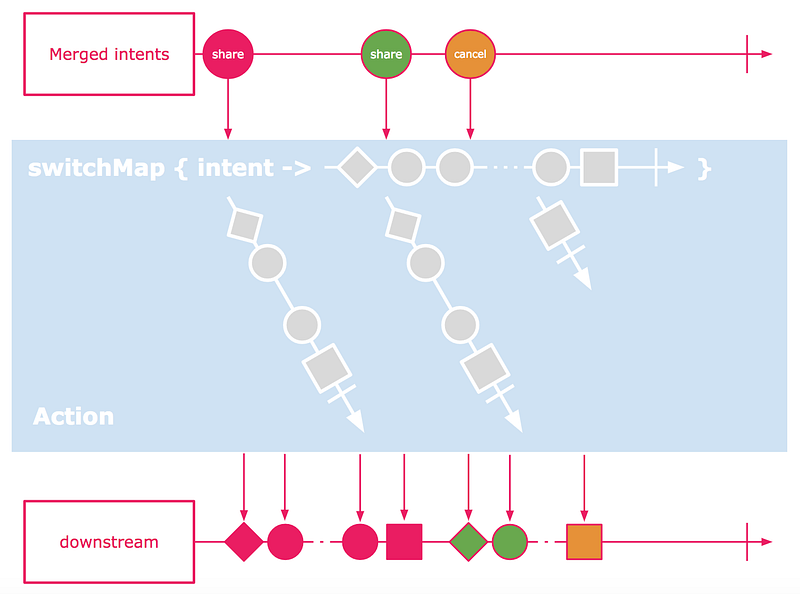
The light-blue box produces an ACTION Observable of states that downstream cares of.
The code snippet is like:
private val mDisposablesOnCreate = CompositeDisposable()

private val INTENT_OF_DO_SOMETHING      = 0
private val INTENT_OF_CANCEL_EVERYTHING = 1

// Activity onCreate().
override fun onCreate() {
    // Share and cancel input:
    //
    //   start +
    //          \
    //           +----> something in between ----> end.
    //          /
    //  cancel +
    mDisposablesOnCreate.add(
        Observable
            .merge(
                // Share intent.
                onClickShare()
                     .map { _ -> INTENT_OF_DO_SOMETHING },
                // Cancel intent.
                onClickCancel()
                     .map { _ -> INTENT_OF_CANCEL_EVERYTHING })
            // Create a share action or a cancel action.
            .switchMap { intent ->
                when (intent) {
                    INTENT_OF_DO_SOMETHING -> toShareAction()
                    INTENT_OF_CANCEL_EVERYTHING -> toCancelAction()
                    else -> toCancelAction()
                }
            }
            .subscribe { _ ->
                Log.d("xyz", "all finished!")
            })
}

// Activity onDestroy()
override fun onDestroy() {
    mDisposablesOnCreate.clear()
}

// "Share" button observable.
fun onClickShare(): Observable<Any> { ... }
// "Cancel" button observable.
fun onClickCancel(): Observable<Any> { ... }
And the action code is like:
private fun toShareAction(): Observable<ShareProgressState> {
    // 1. Generate BMP
    return getGenBmpObservable()
        // 2. Show dialog
        .switchMap { _ ->
            getDialogSingle()
                .toObservable()
        }
        // 3. Share
        .switchMap { dialogPayload ->
            if (dialogPayload.result == RESULT_OK) {
                // If the user clicks OK, share to FB.
                getShareToFacebookObservable(dialogPayload.data)
            } else {
                // The EMPTY observable calls observer's onComplete()
                // to indicate the stream is over.
                Observable.empty()
            }
        }
}

/**
 * Returns a CANCEL action.
 */
private fun toCancelAction(): Observable<ShareProgressState> {
    return Observable.just(ShareProgressState(justStop = true))
}
It works because the cancelation creates a cancel action and it replaces the previous action. By replacing, the old action stream is disposed before the new action stream is attached. The magic is done by the switchMap operator.
Try #3, better reactive approach with “switchMap” and “takeUntil”:
So far so good, the observable chain stays alive with the cancel signal. However, the previous approach couples the two actions together where share and cancel actions both produce ShareProgressState. Why would the cancel action produce a ShareProgressState? It doesn’t make sense at all and the code is not flexible when there are more actions.
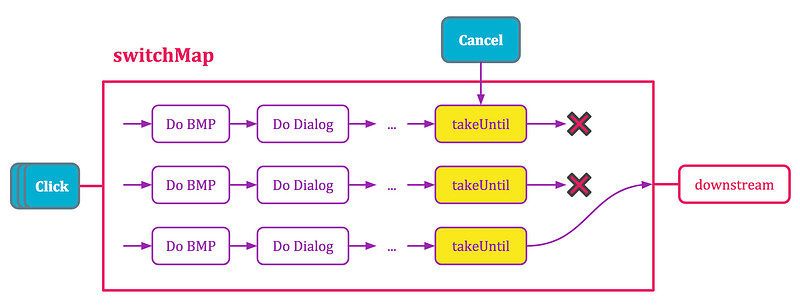
We could simplify the code with takeUntil operator. The takeUntil produces a special observable that self terminates when the second observable (given as the argument) emits an item.
The
takeUntiloperator essentially says: “I am interested in this stream/Observable until something happens on that stream/Observable”.
— Jaime Cham
private val mDisposablesOnCreate = CompositeDisposable()

// Activity onCreate().
override fun onCreate() {
    // Long computation operation.
    mDisposablesOnCreate.add(
        // Share button.
        onClickShare()
            .switchMap { _ ->
                // First, switchMap convert the click to an action observable.
                // Whenever a new click is received, switchMap interrupt and
                // kills the existing ongoing observable and replace it with
                // the new one.
                // Second, subscribe to the action observable with a cancel
                // throttle where the takeUntil self terminates and also kill
                // the action observable when a cancel signal is received.
                toShareAction()
                    .takeUntil(mCancelSrc)
            }
            .subscribe { _ ->
                Log.d("xyz", "all finished!")
            })

    // Cancel signal.
    mDisposablesOnCreate.add(
        onClickCancel()
            .subscribe { _ ->
                mCancelSrc.onNext(0)
            })
}

// Activity onDestroy()
override fun onDestroy() {
    mDisposablesOnCreate.clear()

// "Share" button observable.
fun onClickShare(): Observable<Any> { ... }
// "Cancel" button observable.
fun onClickCancel(): Observable<Any> { ... }
It visually looks like:
Under The Hood, “switchMap”
This section is optional and I would be digging into switchMap and explain the magic. ✨
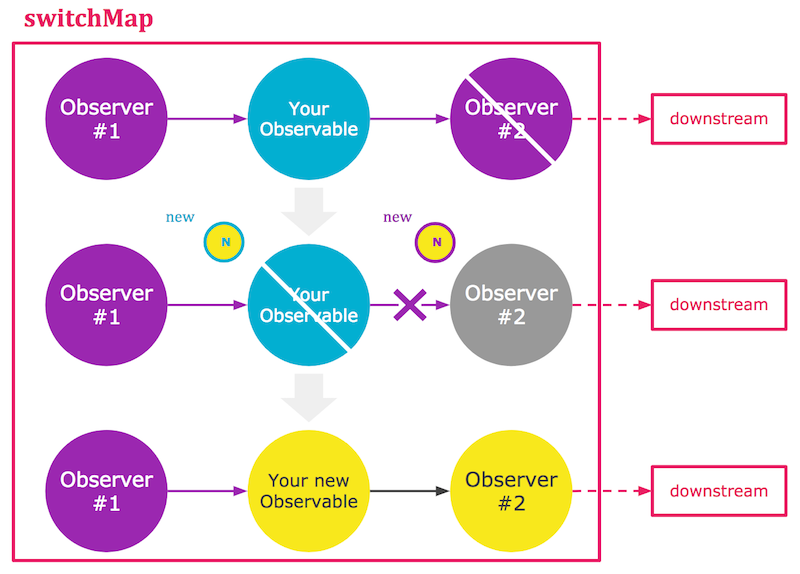
The switchMap converts the received signal to an observable, and it waits for the result fired from the observable and bypass the result to its downstream. Whenever a new signal is received, switchMap interrupts and kills the existing ongoing observable and replace it with the new one.
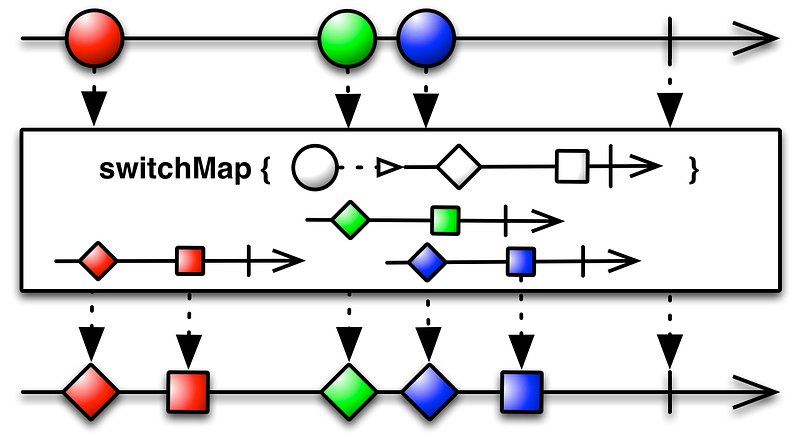
If the marble diagram is still confusing, try this interactive website, switchMap.
The switchMap is very much like flatMap, the only difference is there is only one active inner observer in switchMap, as opposed to that there is a list of active inner observers in flatMap.
The switchMap has two inner observers, where #1 is to subscribe to the external upstream and #2 is to subscribe to the Observable your mapper returned. It holds the inner Disposable and disposes it before the new Observable is attached.
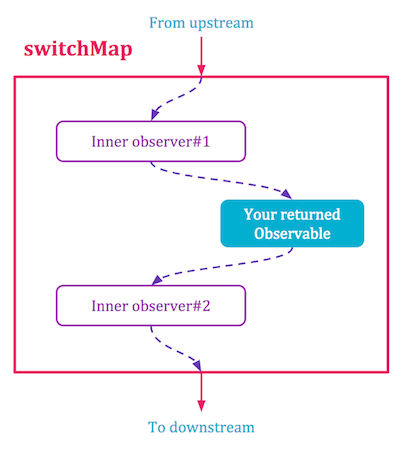
When the inner stream gets disposed, a chained recycling process is happening internally in the switchMap as described below.
The two inner observers are SwitchMapObserver (no. 1) and SwitchMapInnerObserver (no. 2). The code snippet shows you what exactly happens inside the SwitchMapObserver:
// This is the snippet of SwitchMapObserver code.

// 1. The inner observer #1 's onNext, this function is called when it
// receives the data from upstream.
@Override
public void onNext(T t) {
    long c = unique + 1;
    unique = c;

    // 2. Cancel (dispose) the given Observable from your mapper funtion.
    SwitchMapInnerObserver<T, R> inner = active.get();
    if (inner != null) {
        inner.cancel();
    }

    ObservableSource<? extends R> p;
    try {
        p = ObjectHelper.requireNonNull(mapper.apply(t), "The ObservableSource returned is null");
    } catch (Throwable e) {
        Exceptions.throwIfFatal(e);
        s.dispose();
        onError(e);
        return;
    }

    // 3. Create a new observer #2 and subscribes it to the given Observable.
    SwitchMapInnerObserver<T, R> nextInner = new SwitchMapInnerObserver<T, R>(this, c, bufferSize);

    for (;;) {
        inner = active.get();
        if (inner == CANCELLED) {
            break;
        }
        if (active.compareAndSet(inner, nextInner)) {
            p.subscribe(nextInner);
            break;
        }
    }
}
Disposable
So what happens when the Disposable’s dispose() is called? First, the Disposable is provided by an Observable to its observer so that the observer gets ability to ask its source to stop. It is essentially the bridge that completes the link from bottom to top.
It is your responsibility to terminate or recycle any unfinished task in the dispose() or onDispose().
Sample Code
Check out my Github project here.
Conclusion
- RxJava is essentially a framework that builds double-linked-list of lambda functions. It has the concept of a stream of states, as opposed to many defer-promising libraries that have only the starting and finishing states.
- Encapsulate the chain of the Observables you want to cancel at once as a big Observable.
- Throttle the action observable with
takeUntil. - Use
switchMapto replace the unfinished action stream. This operator would dispose the current Observable before it attaches the new one to its inner observer. - Make sure to return a COLD Observable in the
switchMap. Returning a hot Observable like Subject would create a lot of leaking chains.
Lastly, I strongly recommend you to study the code of RxAndroid or RxBinding to get better understanding. The code tracing is made easier by setting breakpoints in the ObservableSwitchMap or BasicFuseableObserver.
Thanks for reading. If you think this post is helpful, please don’t hesitate to give the claps. Or if you found some mistakes I made, feel free to drop a note here. ✨
Reference
- A blog post from Jaime Cham giving “A Gentle Introduction to Reactive Programming (via RxJS)”, link.
- A blog post from Sachin Chandil giving the idea of customizing a disposable Observable, https://android.jlelse.eu/rxjava2-dispose-an-observable-chain-684e6ca2790 .
- Uber has release an interesting RxJava library that terminates the chain automatically, https://uber.github.io/AutoDispose/ .