Many Android apps have splash screen. I used to create the splash screen as follow:
<FrameLayout xmlns:android="http://schemas.android.com/apk/res/android" xmlns:app="http://schemas.android.com/apk/res-auto" xmlns:tools="http://schemas.android.com/tools" android:layout_width="match_parent" android:layout_height="match_parent" tools:context=".SplashScreenActivity"> <android.support.v7.widget.AppCompatImageView android:layout_width="match_parent" android:layout_height="match_parent" android:layout_margin="40dp" android:scaleType="centerInside" android:layout_gravity="center" app:srcCompat="@drawable/img_splash_screen"/></FrameLayout>It seems nothing is wrong with showing the splash screen image through the ImageView in the layout. Yes, it is totally fine except there might be a short moment showing the white screen before showing the splash screen image. It depends on how fast is your Android device. Why is that?
According to the talk given by Cyril Mottier, the window theme is shown prior to your layout. How do we make the short white screen disappeared? Luckily Android provides us the Drawable and android:windowBackground attribute.
Solution
Step 1: Convert the splash screen defined in the layout to a Drawable.
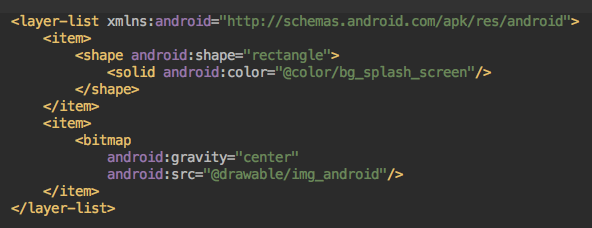
drawable/img_splash_screen_for_window_theme.xml
Step 2: Create a special theme and assign the Window drawable. For example: android:windowBackground=@drawable/your_splash_screen .
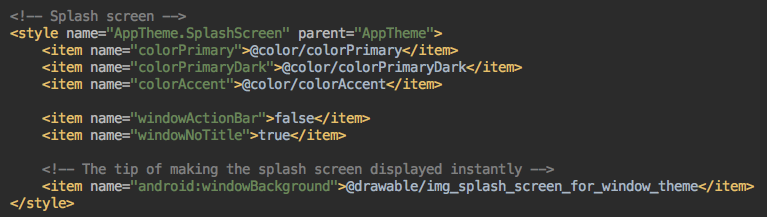
values/styles.xml
Step 3: Apply the special theme to your splash screen Activity.
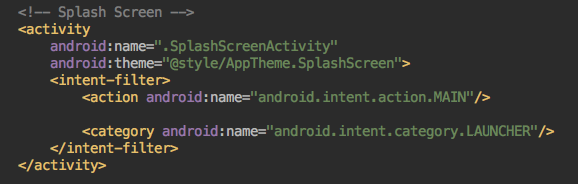
Reference
Android Drawable is really a good mechanism to flatten the view hierarchy. Please watch Cyril Mottier’s talk for better understanding:
Here is also the link for the Android Drawable. Thanks for reading and hope it also helps you.